
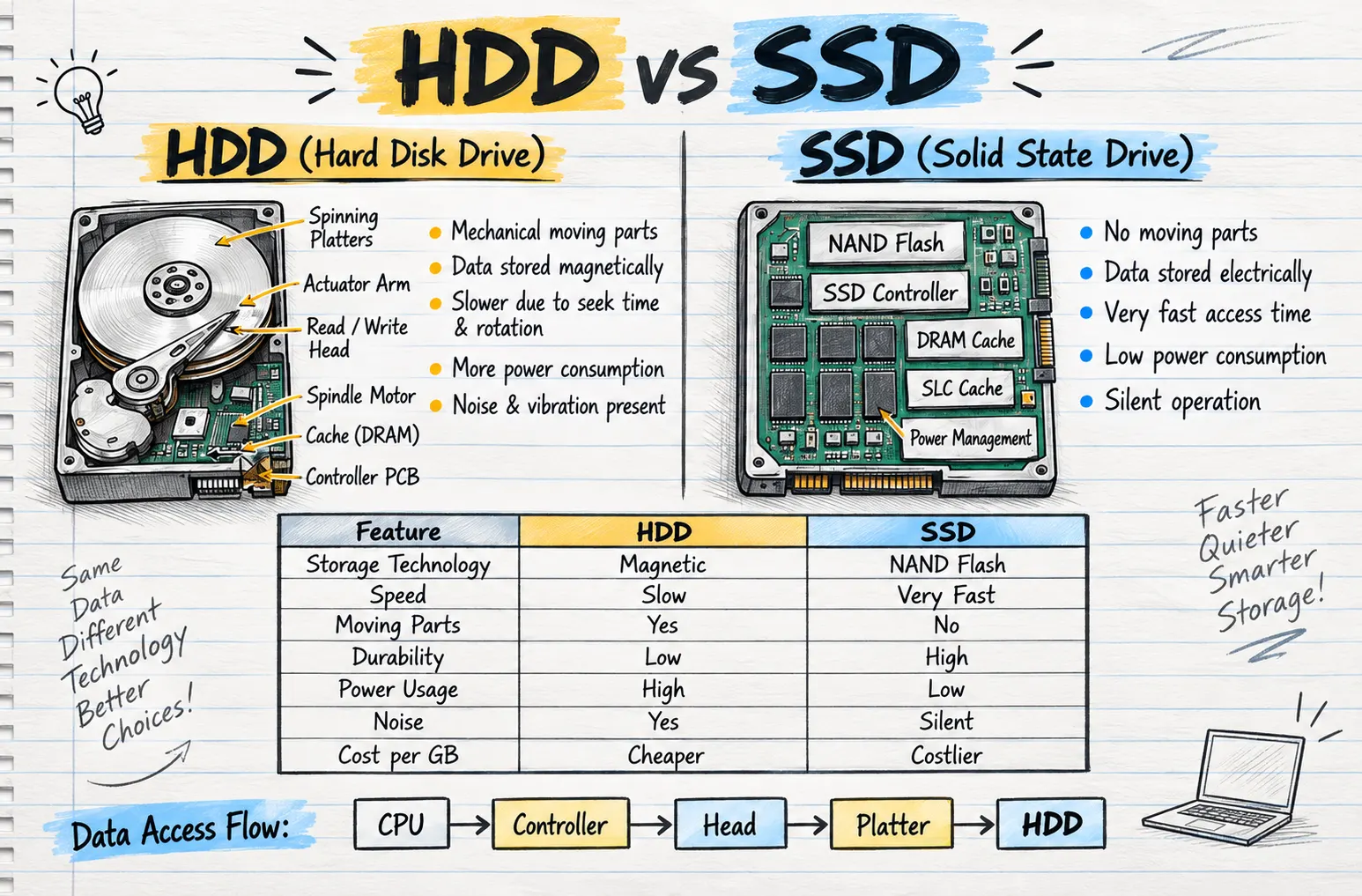
When choosing storage for a computer, two common options are HDD and SSD. Both are designed to store data, but the way they work is very different. These differences affect their speed, durability, power consumption, noise levels and cost.
HDD stands for Hard Disk Drive, while SSD stands for Solid State Drive. An HDD uses mechanical components and magnetic storage, whereas an SSD stores data electronically using NAND flash memory.
Understanding these basic differences can make it easier to see how each type of storage works and where their strengths lie.
What Is an HDD?
A Hard Disk Drive (HDD) is a storage device that stores data magnetically. It contains several mechanical components that work together whenever data needs to be read or written.
One of the main components inside an HDD is the spinning platter. Data is stored on these platters, which rotate while the drive is operating.
An actuator arm moves the read/write head to the required position on the platter. The read/write head is responsible for accessing and writing data.
The drive also contains a spindle motor, which rotates the platters. Other important components include the DRAM cache and controller PCB, which help manage the operation of the drive.
Because an HDD relies on moving mechanical components, accessing data requires physical movement inside the drive.
How Does an HDD Store and Access Data?
An HDD stores information magnetically on its spinning platters.
When data needs to be accessed, the drive must locate the correct position on the platter. The actuator arm and read/write head move into position while the platter rotates underneath.
This process creates what is known as seek time and rotational delay. As a result, HDD storage is generally slower when compared with SSD technology.
The presence of moving components also means an HDD can produce noticeable noise and vibration while operating.
What Is an SSD?
A Solid State Drive (SSD) takes a very different approach to data storage.
Unlike an HDD, an SSD does not contain spinning platters, actuator arms or other moving mechanical components. Instead, it stores information electronically.
The main storage technology used in an SSD is NAND flash memory. This allows information to be stored without relying on magnetic spinning disks.
An SSD also includes an SSD controller, which manages the data stored within the drive. Other components shown within SSD architecture can include DRAM cache, SLC cache and power management.
Together, these components allow the SSD to manage and access stored information efficiently.
Why Is an SSD Faster Than an HDD?
One of the biggest differences between HDD and SSD technology is data access speed.
An HDD has to physically move its read/write head and rotate its platters to find the required data. This mechanical process takes additional time.
An SSD does not have this limitation. Because data is stored and accessed electronically, there is no need to wait for a mechanical component to move into the correct position.
This gives an SSD very fast access times, while an HDD is comparatively slower because of seek time and platter rotation.
Moving Parts and Durability
Another important difference is the use of moving parts.
An HDD contains several moving mechanical components. Its platters continuously rotate during operation, while the actuator arm and read/write head move to access data.
An SSD contains no moving parts.
This difference also affects durability. In a general comparison, HDDs have lower durability, while SSDs offer higher durability because they do not depend on moving mechanical components.
Power Consumption
HDDs and SSDs also differ in how much power they use.
An HDD requires power to operate its spindle motor, rotate the platters and move its internal mechanical components. As a result, its overall power usage is comparatively high.
An SSD has lower power consumption because it does not need to power spinning platters or other moving components.
Therefore, when comparing the two technologies purely in terms of power usage, SSDs are more efficient.
Noise and Vibration
Noise is another clear difference between HDDs and SSDs.
Because an HDD contains moving parts, some noise and vibration can be present while the drive is operating.
An SSD works electronically and contains no moving mechanical components. This allows it to provide silent operation.
For users who value quieter computer operation, this is an important difference between the two storage technologies.
HDD vs SSD Comparison
The main differences can be summarised simply:
| Feature | HDD | SSD |
|---|---|---|
| Storage Technology | Magnetic | NAND Flash |
| Speed | Slow | Very Fast |
| Moving Parts | Yes | No |
| Durability | Lower | Higher |
| Power Usage | High | Low |
| Noise | Yes | Silent |
| Cost per GB | Cheaper | Costlier |
Which Storage Technology Stands Out?
Both HDDs and SSDs are designed to store data, but they achieve this in very different ways.
An HDD offers cheaper storage per gigabyte and uses magnetic storage technology. However, its mechanical design means it is slower, consumes more power and can produce noise and vibration.
An SSD uses NAND flash memory and has no moving parts. It provides much faster data access, lower power consumption, silent operation and higher durability. The trade-off is that its cost per gigabyte is generally higher.
Final Thoughts
The key difference between HDD and SSD is the technology used to store and access data.
HDDs depend on magnetic storage and mechanical moving parts such as spinning platters, an actuator arm and a read/write head. SSDs use NAND flash memory and electronic components without moving parts.
This fundamental difference explains why SSDs provide faster access, lower power usage, silent operation and greater durability, while HDDs remain the cheaper option in terms of cost per gigabyte.
Understanding these differences makes it much easier to compare the two storage technologies and recognise the advantages and limitations of each.